Testing Bandwidth

Use iperf3.exe to test bandwidth between a client and server by using iperf3 on the command line.

On the server…

iperf3 -s

On the client…

iperf3 -c <host>

Tip: Within File Explorer press shift and right click mouse allows you to open a command line from the directory the executable is in.


GNS3 Windows Appliance

The GNS3 appliance template file may not match the filename downloaded and will complain about the MD5 checksum not matching. Make a note of the MD5 checksum for the new filename as you will need this when you edit the appliance .GNS3a file.

For example, the downloadable filename for Windows 7 with IE11 changed from “IE11_-_Win7-disk1.vmdk” to “IE11-Win7-VMWare-disk1.vmdk”.

Find the places where the old filename are mentioned and change the filename to the new filename and alter the md5sum, and no need to alter the filesize.

Before

{
“filename”: “IE11_-_Win7-disk1.vmdk”,
“version”: “7 w/ IE11”,
“md5sum”: “5733cc93a6ed756c2358f0a383b411a8”,
“filesize”: 4101495296,
“download_url”: https://developer.microsoft.com/en-us/microsoft-edge/tools/vms/

},

{
“name”: “7 w/ IE11”,
“images”: {
“hda_disk_image”: “IE11_-_Win7-disk1.vmdk”
}
},

After

{
“filename”: “IE11-Win7-VMWare-disk1.vmdk”,
“version”: “7 w/ IE11”,
“md5sum”: “d682fde5fc4d8fd4374fdeca70fd2011”,
“filesize”: 4101495296,
“download_url”: https://developer.microsoft.com/en-us/microsoft-edge/tools/vms/

},

{
“name”: “7 w/ IE11”,
“images”: {
“hda_disk_image”: “IE11-Win7-VMWare-disk1.vmdk”
}
},

VSP Flight-recorder

voss01:1#flight-recorder ?
Perform actions on flight-recorder data
all       Create flight-recorder snapshot, trace, and archive
archive   Create tarball of flight-recorder files, log file, config file, etc.
snapshot  Take snapshot of flight-recorder PMEM data
trace     Take snapshot of always-on-trace data
voss01:1#flight-recorder all ?
{slot[-slot][,…]}  Slot – Valid slot is 1

Example…

flight-recorder all 1

Processing Flight-recorder snapshot for 1 ….

Flight-recorder snapshot for slot 1 complete, filename is /intflash/PMEM/1/pmem.20190311115209.1.tar.gz.

Processing Flight-recorder trace for 1 ….

Flight Recorder trace taken for namServer on slot 1. File: /intflash/flrec/1/trace.20190311115210.namServer-1.txt
Flight Recorder trace taken for cbcp-main.x on slot 1. File: /intflash/flrec/1/trace.20190311115210.cbcp-main.x-1.txt
Flight Recorder trace taken for ssio on slot 1. File: /intflash/flrec/1/trace.20190311115211.ssio-1.txt
Flight Recorder trace taken for logServer on slot 1. File: /intflash/flrec/1/trace.20190311115211.logServer-1.txt
Processing Flight-recorder archive for slot 1 ….

NOTE: Deleting Flight-recorder trace files (if any) from /intflash/flrec/1/ and adding them to the archive
NOTE: Deleting Flight-recorder snapshot files (if any) from /intflash/PMEM/1/ and adding them to the archive

Flight-recorder archive for slot 1 complete, filename is /intflash/archive/1/archive.20190311115212.1.tar

XMC Upgrade

Use the Appliance Upgrade files to update your XMC appliances such as EMC, NAC and Analytics.

SCP to the IP address of the appliance and transfer the upgrade .bin file to a location on the server.

Make the .bin executable using chmod 755 <bin file>.

Run the bin file

./<bin file>

Note:

You will need internet access to complete the upgrade so that Ubuntu packages can be updated.

Check release of Ubuntu by typing command lsb_release -a

Edit /etc/network/interfaces file with nano and add dns-nameservers <DNS server> if not present. The EMC and Analytics allow DNS entries in the interfaces file but NAC uses resolvconf package.

^O Write/Save

^X Exit

On NAC have to use the resolveconf package to setup DNS. Edit /etc/resolvconf/resolv.conf.d/base and enter nameserver <DNS server>.

Sudo resolvconf -u

Bounce the eth0 interface with… sudo ifdown eth0 && sudo ifup eth0

If necessary edit the default route…

ip route del default

ip route add default via <default GW>


Base Unit Select

ERS 4900, ERS 5900

Base Unit Select switch – used to designate the base unit in a stack. When set DOWN, this unit acts as the Base Unit for the stack. Only one switch in the stack must have the Base Unit Select in base position.

ERS 3500, ERS 3600, ERS 4800

Base Unit Select Switch – used to designate the Base Unit in a stack. When set to the RIGHT position, this unit acts as the Base Unit for the stack.


Searching config files

Add multiple show running config files into a folder and use Grep to pick out specific areas of interest that are hits in those files.

Results will include the files name where there is a match.

Useful Grep options:

grep -A 2 “interface loop” *
grep “ip-source-address” *
grep “ip route pref” *

-A After (2 lines)
-B Before
-i Case insensitive
-c Count
-r Recursive
-v Invert
-l Display filenames that match

* Wildcard for all files in current directory.


VSP 8600 VRRP IDs

Customer’s experiencing error when creating 9th VRRP instance.

Error: maximum number of VRRP entries exceeded

Release notes for version 6.2 explains that it is possible to create more than eight VRRP instances but have to re-use the first eight VRRP IDs chosen previously.

“Because there is a hardware limitation of using only eight MAC addresses for VRRP, the number of VRIDs is also limited to eight. You can use any eight values for VRIDs between 1 and 255. However, once you choose the eight VRID values, you must reuse the same eight values across all VLANs on the device.”

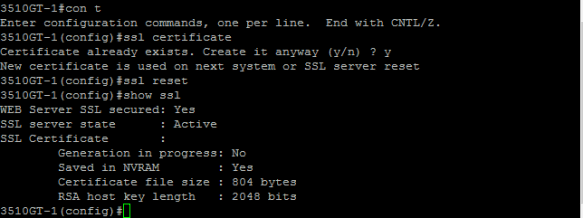
Creating new SSL Certificate on ERS

If have problem connecting to EDM with ERS switch after upgrade of the agent code or to browser then try recreating the SSL certificate:

ssl certificate

ssl reset

show ssl

SSL

Note: Tested with Firefox 65 (64 bit) and Internet Explorer 11 against ERS 5.3.9.011 with HTTPS. Uses SHA-256 with RSA encryption. Chrome version 72 (64 bit) fails with ‘bad format’ error and may need to use an older release (ERR_SSL_SERVER_CERT_BAD_FORMAT).

ISIS Accept Policy External

ISISAcceptExt.PNG

  • The ISIS metric type of external can be used instead of internal type
    • Prefix cost (external metric) with lowest cost will be preferred and if prefix cost is the same, the routes are considered ECMP routes
  •  A route-map can be used to specify metric type of none, internal or external; for example, a route-map can be used to selectively set specific routes as external
  • When deciding which routes to add to the route table, a SPB router
    • Internal type routes
      • Always preferred over External type routes
      • Will always prefer the routes with the shortest path internal metric to the BEB node advertising them
      • Will only use the route external cost (prefix-cost) as a tie breaker
      • For route to go into ECMP, both the internal and external metric must be the same
    • External type routes
      • Will only consider the external route metric (prefix-cost)
      • For route to go into ECMP, only the external metric must be the same
  • External metrics is supported as of release 5.0 for the VSP 4000, VSP 8000, and VSP 7200
    • Only IPv4 routes are supported in this release


Backup Multiple ERS Configurations

Here is a python script which will backup the running-config of multiple ERS switches listed in a text file. This script will send Ctrl + Y code sequence to the switch and run the copy command to a local TFTP server.

Python file sshclientcfg.py:

import paramiko
import time
import getpass

username = raw_input(‘Enter your username: ‘)
password = getpass.getpass()

f = open (‘myswitches.txt’)

for line in f:
ip_address = line.strip()
ssh_client = paramiko.SSHClient()
ssh_client.set_missing_host_key_policy(paramiko.AutoAddPolicy())
ssh_client.connect(hostname=ip_address,username=username,password=password)

print ‘Successful connection’, ip_address

remote_connection = ssh_client.invoke_shell()
remote_connection.send(“\x19”)

print ‘Collecting running-config of ‘ + ip_address

remote_connection.send(‘copy running-config tftp address 192.168.1.100 filename ‘ + ip_address + ‘.asc\n’)

time.sleep(20)
readoutput = remote_connection.recv(655350)
saveoutput = open(‘Log file of ‘ + ip_address, ‘w’)

print ‘Saving to file called Log file of ‘ + ip_address + ‘\n’

saveoutput.write(readoutput)
saveoutput.write(‘\n’)
saveoutput.close

ssh_client.close()

Text file Myswitches.txt:

192.168.1.5
192.168.1.4

Output of script:

$ python sshclientcfg.py

Enter your username: admin

Password:

Successful connection 192.168.1.5

Collecting running-config of 192.168.1.5

Saving to file called Log file of 192.168.1.5

Successful connection 192.168.1.4

Collecting running-config of 192.168.1.4

Saving to file called Log file of 192.168.1.4

Note: The log file captured with the IP of the switch shows the output from the session which is useful to verify if it worked as expected or there was an error. The running-config file generated by the switch will be sent to the TFTP server so look there for the ASCII file.

The line below is used to provide Ctrl + Y response if prompted.

remote_connection.send(“\x19”)