Troubleshooting VSP or ERS

Useful commands:

show tech

Note:

On VSP search output for MAC address with colon format XX:XX:XX:XX:XX:XX.

For ERS search with hyphen format XX-XX-XX-XX-XX-XX.

Fine tuning ERS buffers (leave as default or assess device distribution first):

qos agent buffer <regular | large | maximum>

With this command you can set how much of the buffer a single port can use:

Regular    1 port may use up to 16% of the buffers       for a group of 12 ports.
Large    1 port may use up to 33% of the buffers       for a group of 12 ports.
Maximum    1 port may use 100% of the buffers for a       group of 12 ports.

To take effect a change of the buffer value you have to reboot your ERS switch.

Docker

Can I use VirtualBox alongside Docker 4 Windows?

Unfortunately, VirtualBox (and other hypervisors like VMWare) cannot run when Hyper-V is enabled on Windows.

https://ewc-docs.extremenetworks.com/install/docker.html

https://www.docker.com/community-edition

https://store.docker.com/editions/community/docker-ce-desktop-windows

https://docs.docker.com/docker-for-windows/

https://docs.docker.com/compose/install/

Docker Compose relies on Docker Engine for any meaningful work, so make sure you have Docker Engine installed either locally or remote, depending on your setup.

  • On desktop systems like Docker for Mac and Windows, Docker Compose is included as part of those desktop installs.


Workflow Composer

https://content.extremenetworks.com/extreme-networks-blog/leveraging-automation-and-orchestration-the-precursor-to-ml-and-ai

https://www.extremenetworks.com/product/workflow-composer/

Ubuntu Server:

  1. sudo apt-get install curl
  2. curl -sSL https://stackstorm.com/packages/install.sh | bash -s — –user=st2admin –password=’Ch@ngeMe’

Take EWC for a spin!

https://ewc-docs.extremenetworks.com/start.html

You can also do a lot through the Web UI: Check the history, run actions, configure rules, install packs…check it out at https://{YOUR_ST2_IP}. Login is the same as via the st2 CLI. Default is st2admin/Ch@ngeMe.

https://ewc-docs.extremenetworks.com/reference/cli.html

https://docs.stackstorm.com/

Converting existing scripts into actions:

https://ewc-docs.extremenetworks.com/actions.html#ref-actions-converting-scripts

st2 run packs.setup_virtualenv packs=default
#####################################################################

Action Registration

To register a new action:

  1. Place it into the content location.
  2. Tell the system that the action is available.

The actions are grouped in packs and located at /opt/stackstorm/packs

For hacking one-off actions, the convention is to use the default pack – just create your action in /opt/stackstorm/packs/default/actions. Once you have tested it out, you should move it to a dedicated pack.

Register an individual action by calling st2 action create my_action_metadata.yaml. To reload all actions, use st2ctl reload --register-actions

###############################################

Restart network services:

sudo vim /etc/network/interfaces

# The secondary network interface
auto eth1
iface eth1 inet dhcp

sudo /etc/init.d/networking restart

or

sudo ifdown -a
sudo ifup -a

Enable FTP:

sudo apt install vsftpd

sudo vi /etc/vsftpd.conf

sudo systemctl restart vsftpd.service

https://help.ubuntu.com/lts/serverguide/ftp-server.html.en

sudo chmod -R 777 .

https://content.extremenetworks.com/extreme-network-videos/automated-distributed-packet-capture-and-performance-monitoring


Access Policy

A default access-policy ID 1 exists for services such as FTP, HTTP, TFTP, Telnet and SSH (optional SNMPv3 and rlogin). Access-policy is globally disabled by default. If enabled the policy will be enabled with mode allow.

VSP-8284XSQ:1(config)#show access-policy

AccessPolicyEnable: on

Id: 1
Name: default
PolicyEnable: true
Mode: allow
Service: ftp|http|tftp|telnet|ssh
Precedence: 128
NetAddrType: any
NetAddr: N/A
NetMask: N/A
TrustedHostAddr: N/A
TrustedHostUserName: none
AccessLevel: readOnly
AccessStrict: false
Usage: 5

This can cause a log message like below if a third party application uses SNMPv2 to communicate with the switch.

Example,

VSP-8284XSQ:1(config)#show log file tail
1 2018-05-17T10:44:47.329Z VSP-8284XSQ CP1 – 0x00004746 – 00000000 GlobalRouter SNMP INFO snmpv3 connection access from IP 10.10.10.10 is denied by no matching policy

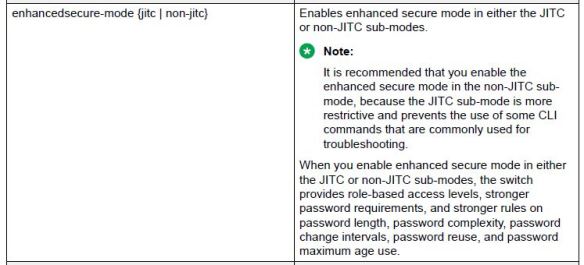
Enhanced Secure Mode

After enabling enhanced security mode on the switch, you will be able to login for the first time using a user name and password of admin/admin and then will be prompted to change both the user name and password. The password for the admin user must be 15 characters and made up of two of the following characters:

 Two uppercase character, from the range: ABCDEFGHIJKLMNOPQRSTUVWXYZ

 Two lowercase character, from the range: abcdefghijklmnopqrstuvwxyz

 Two numeric character, from the range: 1234567890

 Two special character, from the range: `~!@#$%^&*()_-+={[}]|\:;”’<,>.?/

Please note the above requirement applies only to the administrator user.

enhanced

Boot Flags

VSP-8284XSQ:1(config)#show boot config flags
flags block-snmp false
flags debug-config false
flags debugmode false
flags dvr-leaf-mode false
flags enhancedsecure-mode false
flags factorydefaults false
flags flow-control-mode false
flags ftpd false
flags hsecure false
flags ipv6-egress-filter false
flags ipv6-mode false
flags logging true
flags nni-mstp false
flags reboot true
flags rlogind false
flags spanning-tree-mode mstp
flags spbm-config-mode true
flags sshd false
flags syslog-rfc5424-format true
flags telnetd false
flags tftpd false
flags trace-logging false
flags urpf-mode false
flags verify-config true
flags vrf-scaling false
flags vxlan-gw-full-interworking-mode false

flags1

flags2


Running Config Modules

VSP-8284XSQ:1(config)#show run mod ?
boot          Display boot configuration
cfm           Display cfm configuration
chef          Display chef configuration
cli           Display cli configuration
diag          Display diag configuration
dvr           Display dvr configuration
eap           Display eap configuration
energy-saver  Display energy-saver configuration
fa            Display fa configuration
fhs           Display fhs configuration
filter        Display filter configuration
ike           Display ike configuration
ip            Display ip configuration
ipsec         Display ipsec configuration
ipv6          Display ipv6 configuration
isis          Display isis configuration
i-sid         Display i-sid configuration
lacp          Display lacp configuration
license       Display license configuration
lldp          Display lldp configuration
lst           Display lst configuration
macsec        Display macsec configuration
mlt           Display mlt configuration
naap          Display naap configuration
nls           Display nls configuration
ntp           Display ntp configuration
ovsdb         Display ovsdb configuration
port          Display port configuration
qos           Display qos configuration
radius        Display radius configuration
rmon          Display rmon configuration
sflow         Display sflow configuration
security      Display security configuration
slamon        Display slamon configuration
slpp          Display slpp configuration
smtp          Display smtp configuration
spbm          Display spbm configuration
stg           Display stg configuration
sys           Display sys configuration
tacacs        Display tacacs configuration
vlan          Display vlan configuration
web           Display web configuration
vxlan         Display vxlan configuration