SPB-PIM Gateway

Multicast over Fabric Connect cannot connect to a PIM router that is external to the SPB network.

When a receiver joins the SPB network for a specific group, the receiver must receive multicast streams in the neighboring multicast domains (PIM network). Similarly, a receiver in the neighboring multicast domain (PIM network) must receive multicast streams from sources in the SPB network. SPB-PIM Gateway (SPB-PIM GW) provides multicast inter-domain communication between an SPB network and a PIM network. SPB-PIM GW accomplishes this inter-domain communication across a special gateway VLAN. The gateway VLAN communicates with the PIM network through a subset of the full protocol messaging required for RFC 4601 compliance of a PIM interface, and translates the PIM network requirements into SPB language and vice versa.


Spanning-Tree (VOSS)

The switch supports Rapid Spanning Tree Protocol (RSTP) and Multiple Spanning Tree Protocol (MSTP).

Spanning Tree

Spanning Tree protocols detect and eliminate logical loops in a bridged or switched network. If multiple paths exist, the spanning Tree algorithm configures the network so that a bridge or device uses the root bridge path based on hop counts. Although link speed is taken into account, the path is based on the root bridge rather than on an optimized path. If that path fails, the protocol automatically reconfigures the network and makes another path active, thereby sustaining network operations. The switch supports RSTP and MSTP but can downgrade a port automatically if it receives an STP Bridge Protocol Data Unit (BPDU) from a switch that runs STP.

Note:

Spanning Tree is disabled on all Switched UNI (S-UNI) ports. The ports will move into forwarding state as soon as the physical port or VLACP or LACP comes up on the port. If the platform VLAN is associated to the S-UNI Service Instance Identifier (I-SID), then the S-UNI ports added to the platform VLAN will become the member of MSTP instances associated with the platform VLAN. To enable SLPP on the S-UNI ports, the platform VLAN must be associated with the S-UNI I-SID.

Spanning Tree Groups

Spanning Tree Groups (STGs) represent logical topologies. A topology is created based on bridge configuration values such as root bridge priority. In the case of multiple STGs, you can map a VLAN to the most appropriate logical topology in the physical network.

The switch supports Spanning Tree modes RSTP and MSTP. The default Spanning Tree mode is MSTP. The default STG is 0. In RSTP mode, all VLANs run in the default STG. In MSTP mode, you can create additional STGs by using the VLAN create command. The switch supports up to 64 STGs.

Although STP and MSTP are variations of the same Spanning Tree protocol, they communicate information differently. A switch in MSTI mode cannot recognize the Spanning Tree groups running on a chassis configured with STP. MSTP Spanning Tree groups are not the same as STP Spanning Tree groups. Using a switch in MSTP mode with a chassis in STP mode can create a loop in the network.

The root bridge for Rapid Spanning Tree Protocol (RSTP) and Multiple Spanning Tree Protocol (MSTP) is determined by comparing attributes of each bridge in the network.

The protocol considers bridge priority first. If more than one bridge has the same priority, then the protocol must consider the bridge ID. The bridge with the lowest ID becomes the root bridge. For MSTP, this bridge is called the Common and Internal Spanning Tree (CIST) Root because it is the root of the entire physical network.

In MSTP mode, you can create additional Spanning Tree instances, by using the VLAN command.

These instances, known as Multiple Spanning Tree Instances (MSTIs), can assign different priorities to switches. The MSTIs have different link costs or port priorities and as a result create separate logical topologies.

MSTP also allows the creation of MSTP regions. A region is a collection of switches sharing the same view of physical and logical topologies. For switches to belong to the same region, the following attributes must match:

• MSTP configuration ID selector

• MSTP configuration name

• MSTP configuration revision number

• VLAN instance mapping

Links connecting sections are called boundary ports. In a region, the boundary switch that contains the boundary port providing the shortest external path cost to the CIST Root is the CIST Regional Root.

STGs and VLANs

When you map VLANs to STGs, be aware that all links on the bridge belong to all STGs. Because each Spanning Tree group can differ in its decision to make a link forwarding or blocking, you must ensure that the ports you add to a VLAN are in the expected state.

Untagged ports can only belong to one VLAN and therefore can only belong to one STG. Tagged ports can belong to multiple VLANs and therefore to multiple STGs.
 

Access Policy

A default access-policy ID 1 exists for services such as FTP, HTTP, TFTP, Telnet and SSH (optional SNMPv3 and rlogin). Access-policy is globally disabled by default. If enabled the policy will be enabled with mode allow.

VSP-8284XSQ:1(config)#show access-policy

AccessPolicyEnable: on

Id: 1
Name: default
PolicyEnable: true
Mode: allow
Service: ftp|http|tftp|telnet|ssh
Precedence: 128
NetAddrType: any
NetAddr: N/A
NetMask: N/A
TrustedHostAddr: N/A
TrustedHostUserName: none
AccessLevel: readOnly
AccessStrict: false
Usage: 5

This can cause a log message like below if a third party application uses SNMPv2 to communicate with the switch.

Example,

VSP-8284XSQ:1(config)#show log file tail
1 2018-05-17T10:44:47.329Z VSP-8284XSQ CP1 – 0x00004746 – 00000000 GlobalRouter SNMP INFO snmpv3 connection access from IP 10.10.10.10 is denied by no matching policy

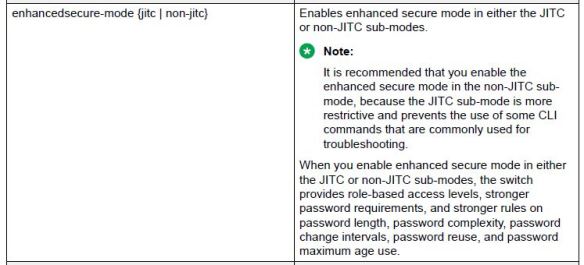
Enhanced Secure Mode

After enabling enhanced security mode on the switch, you will be able to login for the first time using a user name and password of admin/admin and then will be prompted to change both the user name and password. The password for the admin user must be 15 characters and made up of two of the following characters:

 Two uppercase character, from the range: ABCDEFGHIJKLMNOPQRSTUVWXYZ

 Two lowercase character, from the range: abcdefghijklmnopqrstuvwxyz

 Two numeric character, from the range: 1234567890

 Two special character, from the range: `~!@#$%^&*()_-+={[}]|\:;”’<,>.?/

Please note the above requirement applies only to the administrator user.

enhanced

Boot Flags

VSP-8284XSQ:1(config)#show boot config flags
flags block-snmp false
flags debug-config false
flags debugmode false
flags dvr-leaf-mode false
flags enhancedsecure-mode false
flags factorydefaults false
flags flow-control-mode false
flags ftpd false
flags hsecure false
flags ipv6-egress-filter false
flags ipv6-mode false
flags logging true
flags nni-mstp false
flags reboot true
flags rlogind false
flags spanning-tree-mode mstp
flags spbm-config-mode true
flags sshd false
flags syslog-rfc5424-format true
flags telnetd false
flags tftpd false
flags trace-logging false
flags urpf-mode false
flags verify-config true
flags vrf-scaling false
flags vxlan-gw-full-interworking-mode false

flags1

flags2


Running Config Modules

VSP-8284XSQ:1(config)#show run mod ?
boot          Display boot configuration
cfm           Display cfm configuration
chef          Display chef configuration
cli           Display cli configuration
diag          Display diag configuration
dvr           Display dvr configuration
eap           Display eap configuration
energy-saver  Display energy-saver configuration
fa            Display fa configuration
fhs           Display fhs configuration
filter        Display filter configuration
ike           Display ike configuration
ip            Display ip configuration
ipsec         Display ipsec configuration
ipv6          Display ipv6 configuration
isis          Display isis configuration
i-sid         Display i-sid configuration
lacp          Display lacp configuration
license       Display license configuration
lldp          Display lldp configuration
lst           Display lst configuration
macsec        Display macsec configuration
mlt           Display mlt configuration
naap          Display naap configuration
nls           Display nls configuration
ntp           Display ntp configuration
ovsdb         Display ovsdb configuration
port          Display port configuration
qos           Display qos configuration
radius        Display radius configuration
rmon          Display rmon configuration
sflow         Display sflow configuration
security      Display security configuration
slamon        Display slamon configuration
slpp          Display slpp configuration
smtp          Display smtp configuration
spbm          Display spbm configuration
stg           Display stg configuration
sys           Display sys configuration
tacacs        Display tacacs configuration
vlan          Display vlan configuration
web           Display web configuration
vxlan         Display vxlan configuration

VOSS Features

VOSS 7.0

Max number IP interfaces: 506

(Result upon adding IP interface 507 – Error: Insufficient resources available to create IP.)

Max number DHCP-Relay Fwd-Path: 1024

Max number DHCP-Relay Fwd-Path per VLAN: 10

(Result upon adding 11th Fwd-Path – Error: DHCP maximum number of forwarding records added)

VOSS interfaces are shutdown by default so have to do no shutdown command within interface context.